If your email still runs on aging servers, your files are scattered across network drives, and every team collaborates in whatever tool it found first, you already know the workplace has outgrown the setup behind it. Microsoft 365 migration services exist to close that gap, and for mid-market enterprises the stakes are higher than they look. You have enough users, data, and compliance exposure that a sloppy move hurts, but rarely enough internal specialists to absorb a project this size without help.
This guide explains what these services actually include, how a well-run migration unfolds, where things go wrong, and how to decide who should do the work.
What Are Microsoft 365 Migration Services?
Microsoft 365 migration services are the planning, technical execution, security configuration, and user adoption work needed to move an organization’s email, files, identity, and collaboration tools into Microsoft 365 with minimal disruption to the business.
That definition matters because many buyers picture a migration as a data copy job. It is not. Copying mailboxes is the easy part. The real work sits around it: deciding what moves and what gets retired, mapping permissions, configuring identity and security, protecting regulated data, and getting people to actually use the new environment on day one.
You will also see this work described as o365 migration services. Office 365 was the earlier name for Microsoft’s cloud productivity suite, and Microsoft 365 is the broader bundle that adds Windows, device management, and advanced security licensing. The label changed, but the core project did not, so the two terms are used interchangeably across the industry.
Why Mid-Market Enterprises Are Moving Now
Mid-market organizations tend to hit the same set of pressures at roughly the same time:
- Aging on-premises infrastructure. Exchange servers, file servers, and legacy intranets reach end of life and become expensive to patch and defend.
- Security and compliance demands. Cyber insurance questionnaires, customer audits, and industry regulations now expect controls like multi-factor authentication, data loss prevention, and audit logging.
- Hybrid and distributed work. People need the same experience in the office, at home, and on a phone.
- Tool sprawl. Several chat apps, file sharing services, and meeting platforms create cost, risk, and confusion.
- AI readiness. Tools like Microsoft Copilot depend on well-organized, well-permissioned content in Microsoft 365. A messy source environment limits what you can do next.
For many organizations, migration is the first real step toward digital workplace transformation, not just an IT housekeeping task.
What a Microsoft 365 Migration Actually Covers
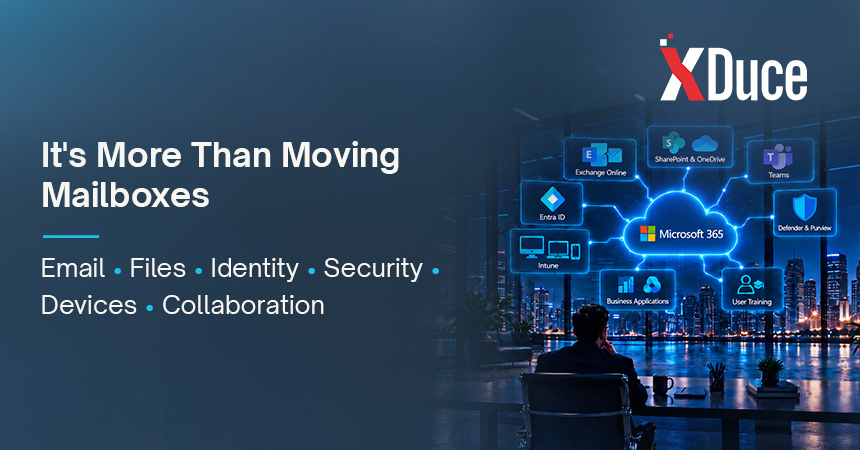
A complete engagement usually spans more workloads than buyers expect. Here is what a mid-market project typically touches:
- Email and calendars. Mailboxes, shared mailboxes, distribution lists, resource rooms, and mail flow rules moving to Exchange Online.
- Files and content. File shares, personal drives, and legacy document systems moving to SharePoint and OneDrive, with permissions rebuilt rather than blindly copied.
- Collaboration. Teams structure, naming, governance, and the retirement of competing tools.
- Identity and access. Microsoft Entra ID, single sign-on, multi-factor authentication, and conditional access policies.
- Devices and endpoints. Enrollment and policy management through Intune where it applies.
- Security and compliance. Defender, Purview, retention, sensitivity labels, and data loss prevention.
- Line of business integrations. Apps that send mail, read calendars, or depend on file paths and need to be re-pointed or rebuilt.
- Training and adoption. Role-based enablement so productivity does not dip after go-live.
If a proposal only mentions mailbox counts and cutover dates, it is describing a fraction of the work.
Common Microsoft 365 Migration Approaches
The right approach depends on your source environment, your user count, and how much downtime the business can tolerate.
| Approach | Best for | How it works | Main trade-off |
|---|---|---|---|
| Cutover migration | Smaller organizations with a simple email environment | Moves all mailboxes in a short window | Less flexibility, higher pressure on one weekend |
| Hybrid migration | Mid-market and larger organizations that need coexistence | Connects on-premises and cloud so users move in waves | More configuration up front, smoother user experience |
| Tenant to tenant migration | Mergers, acquisitions, and divestitures | Moves users and data between two Microsoft 365 tenants | Complex identity, domain, and licensing sequencing |
| Third-party platform migration | Organizations coming from Google Workspace or other suites | Uses specialized tooling to move mail, files, and calendars | Format differences and permission mapping need careful testing |
| File share and content migration | Teams modernizing document storage | Moves shares and legacy repositories into SharePoint and OneDrive | Cleanup and permission design take longer than the transfer |
Most mid-market organizations land on a hybrid or phased approach, because moving everyone at once leaves little room to learn from early waves.
The Microsoft 365 Migration Process, Step by Step

A disciplined migration follows a predictable path. The names vary between providers, but the sequence rarely does.
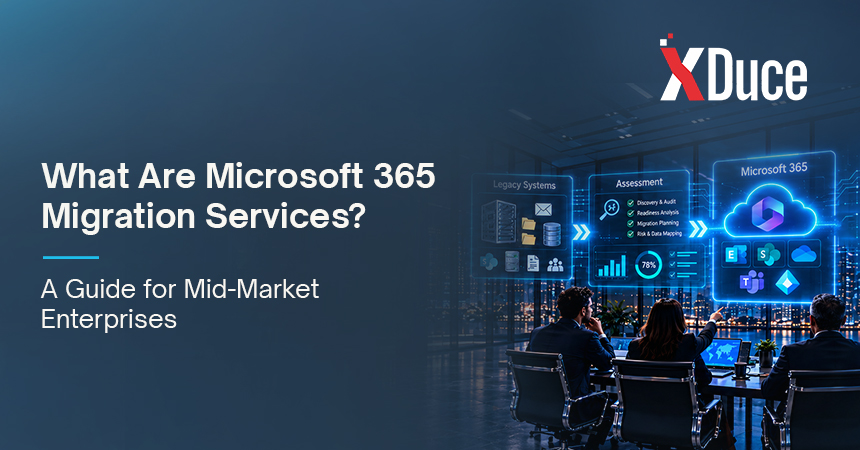
- Discovery and assessment. Inventory mailboxes, file shares, applications, integrations, licenses, and security posture. Identify stale data, shadow IT, and dependencies nobody documented.
- Strategy and design. Choose the migration approach, define the target architecture, and decide what moves, what gets archived, and what gets retired.
- Readiness and preparation. Clean up directories and permissions, prepare identity, configure security baselines, and fix problems in the source before they follow you to the cloud.
- Pilot. Move a small, representative group first. Test mail flow, access, mobile devices, and the support process under real conditions.
- Wave migration. Move users and data in planned batches, with delta syncs, validation checks, and clear communication before and after each wave.
- Cutover and decommissioning. Finalize mail routing, retire legacy systems safely, and confirm nothing still depends on them.
- Adoption and optimization. Train users by role, gather feedback, tune governance, and measure whether the new environment is delivering what the business case promised.
The steps that get skipped most often are the first and the last. Teams rush discovery to start moving data, then stop at go-live and never measure adoption. Both shortcuts show up later as cost.
Where Dynamics 365 Fits In
Microsoft 365 handles communication, content, and collaboration. Dynamics 365 handles the customer and operational side of the business, including CRM, ERP, and finance. They are separate products, but they work better together, and many mid-market organizations modernize both within the same planning window.
When Teams, Outlook, and SharePoint connect to your customer and financial records, people stop switching between systems to find the context they need. That is why organizations often pair a Microsoft 365 migration with Dynamics 365 consulting services rather than treating the two as unrelated projects. Planning them together also avoids rework, because identity, data governance, and integration decisions made for one affect the other.
From Migration to Modern Workplace Solutions
A migration gets you onto the platform. It does not, on its own, change how people work. Organizations that stop at “everyone is on Microsoft 365” often find they have paid for a modern environment and kept the old habits.
This is where modern workplace solutions and digital workplace consulting come in. The goal is to design how Teams, SharePoint, OneDrive, and the rest of the suite should be used together: which channels exist and why, how knowledge is organized, how approvals flow, and what governance keeps the environment tidy as it grows. A good digital workplace strategy ties those choices to outcomes the business cares about, such as faster onboarding, fewer duplicate documents, or shorter approval cycles.
Think of migration as the foundation and workplace design as the building. You need both, and it is far cheaper to plan the second while you are doing the first.
Risks to Plan For (and How to Avoid Them)
Mid-market migrations rarely fail because of the technology. They fail because of planning gaps.
- Migrating clutter. Moving years of stale files and unused mailboxes inflates cost and carries risk into a new environment. Clean first.
- Broken permissions. Copying files without redesigning access can expose sensitive data or lock people out. Map permissions deliberately.
- Weak security at go-live. Standing up Microsoft 365 with default settings leaves gaps. Configure identity, conditional access, and data protection before users arrive, with support from cybersecurity specialists where internal skills are thin.
- Underestimating integrations. Scanners, line of business apps, and automated workflows that quietly depend on old servers are a classic source of day-one outages.
- Ignoring the people side. If users are not trained and supported, they will fall back to old tools and the project will look like a failure even if the technical work was flawless.
- No rollback plan. Every wave should have a tested way to recover if something behaves unexpectedly.
What to Look for in a Microsoft 365 Consultant
Whether you hire a Microsoft 365 consultant for the full project or only for specific phases, evaluate them on more than a price per mailbox. A strong Microsoft Office 365 consultant should be able to show:
- Relevant certifications and a Microsoft partner track record, ideally in modern work, security, and business applications.
- Experience at your scale. Mid-market environments have different constraints from small offices and from global enterprises.
- A clear methodology that covers discovery, pilot, waves, and adoption, not just data transfer.
- Security and compliance fluency, especially if you operate in a regulated industry.
- A plan for after go-live, including support, governance, and optimization, so you are not left alone the week the project closes.
- References and outcomes, not just a list of tools.
Ask how they handle the hard parts: permissions, integrations, rollback, and adoption. The quality of those answers tells you more than any slide deck.
What Drives the Cost of a Migration
Instead of chasing a single price, understand the factors that move the number:
- Number of users and mailboxes, and total data volume
- Number and complexity of source systems
- Amount of cleanup, archiving, and permission redesign needed
- Security, compliance, and identity requirements
- Integrations and custom applications that must be re-pointed or rebuilt
- Training and change management scope
- Whether you want ongoing managed support after go-live
The cheapest quote often leaves out discovery, security, or adoption. Those items rarely disappear. They come back as unplanned work.
Should You Migrate In-House or Use a Partner?
Some organizations have a capable internal team and a simple environment, and can handle much of the work themselves. Others lack the time, specialized skills, or appetite for risk. Many land in the middle with a co-sourced model where a partner leads design and security while internal staff handle day to day execution.
We break down the trade-offs, with a side by side comparison, in our guide to in-house vs. partner-led Microsoft 365 migration services.
Key Takeaways
- Microsoft 365 migration services cover far more than moving data. They include planning, security, identity, adoption, and decommissioning.
- Most mid-market organizations do best with a phased or hybrid approach and a pilot group.
- Cleanup and permission design before migration save more money than any tooling.
- Pairing migration with workplace design and, where relevant, Dynamics 365 planning prevents rework.
- Choose a partner on methodology, scale fit, and post go-live support, not on price alone.
Frequently Asked Questions
It depends on user count, data volume, source complexity, and how much cleanup is needed. Many mid-market projects run from a couple of months to a full quarter or more when file shares, integrations, and security work are included. Discovery usually reveals the real timeline, so treat any estimate made before it as provisional.
Not if the project is planned properly. A well-run migration uses validation checks, delta syncs for changes made during the move, a pilot group, and a tested rollback plan. Data loss almost always traces back to skipped assessment or rushed cutover rather than the platform itself.
Very little in practice. Office 365 was the earlier name for Microsoft’s cloud productivity apps and services. Microsoft 365 is the broader bundle that adds Windows, device management, and advanced security licensing. People still search for o365 migration services, and the core work of moving email, files, and identity is the same.
Often, yes, at least for part of the project. Internal teams know your business and users, but they may not have run many migrations or deep experience with identity, security, and compliance configuration. A consultant can lead the parts that carry the most risk while your team stays involved. Our guide to in-house vs. partner-led migration walks through how to decide.
They are separate platforms that complement each other. Microsoft 365 covers collaboration and productivity, while Dynamics 365 covers CRM, ERP, and finance. Planning them together helps align identity, data governance, and integrations, and lets teams work with customer and financial context inside the tools they already use.

Related Blogs